
IJNSA 02
ACCESS DETECTION SYSTEM ON WEB CAMERAS AND MICROPHONES
Homam El-Taj, Amena Khoja, Basmah Alsharif, Dana Alsulami, and Jumaina Abdulmajed
Dar Al-Hekma University, Cybersecurity Department, Jeddah, Saudi Arabia
ABSTRACT
The proliferation of unauthorized access to webcams and microphones poses significant risks to user privacy and security. Current tools in the market fail to provide comprehensive detection and prevention mechanisms, often lacking hybrid capabilities and quick responses. SilentEye is a proposed system designed to address these gaps by integrating active monitoring, a database-driven detection approach, and automated mitigation features. Built for Windows PCs, SilentEye combines PowerShell scripts, Python-based interfaces, and MySQL databases to detect and respond to both known and unknown threats. This paper outlines the architecture, workflow, and proposed functionality of SilentEye, highlighting its ability to disable compromised devices, notify users of unauthorized access, and adapt dynamically through its evolving database. Though currently limited in platform scope and attack coverage, SilentEye lays the groundwork for a scalable, AI-enhanced detection framework. By addressing critical vulnerabilities and setting new standards for privacy protection, SilentEye demonstrates its potential as a robust tool in the evolving landscape of cybersecurity. Future work will focus on testing, cross-platform expansion, and integration of advanced machine learning techniques to further enhance its capabilities.
KEYWORDS
Unauthorized access detection, Webcam security, Microphone security, PowerShell
1. INTRODUCTION
Webcams and microphones have become integral to modern life, enabling seamless communication across business, education, and entertainment [4]. As Internet of Things (IoT) devices, they bridge the gap between the physical and digital worlds, capturing and transmitting video and audio data with unprecedented ease [5]. Built-in webcams offer convenience through their integration into devices, while external webcams provide flexibility with advanced features such as high resolution, adjustable focus, and superior field of view [1]. Similarly, embedded microphones facilitate essential activities like voice calls, recordings, and interactions with virtual assistants, while external microphones cater to users seeking enhanced functionality for specific tasks [6]. These devices, though vital, are not without vulnerabilities.
The widespread adoption of webcams and microphones has exposed users to significant cybersecurity risks [7]. Attackers exploit device vulnerabilities in operating systems, applications, and network connections to gain unauthorized access, allowing them to monitor users, record sensitive data, or engage in malicious activities such as blackmail and identity theft [8]. As the reliance on these devices grows, particularly in the wake of remote work and virtual interactions, the threat landscape continues to evolve, highlighting the urgent need for robust security measures [9].
Central to mitigating these risks is the concept of access control. Access, in the context of cybersecurity, defines the privileges assigned to users for interacting with systems and data [10]. Proper access control involves authentication, which verifies user identity, and authorization, which enforces specific access rights [9]. Despite advancements in access control mechanisms, unauthorized access remains a pervasive challenge, with attackers bypassing traditional protections to exploit webcams and microphones [8]. This underscores the importance of detection systems capable of identifying and responding to these threats in real time [2].
Detection mechanisms in cybersecurity are designed to uncover concealed threats within systems or networks [2]. These mechanisms rely on two primary approaches: anomaly-based detection, which identifies deviations from normal behavior, and signature-based detection, which recognizes predefined malicious patterns [3]. Effective detection not only minimizes potential damage but also ensures compliance with security standards, helping maintain trust in connected systems [3]. However, existing tools often fall short in addressing hybrid threats targeting both webcams and microphones simultaneously [7].
SilentEye emerges as a comprehensive solution to these challenges. Combining active monitoring, a dynamic database of attack signatures, and an intuitive notification system, SilentEye is designed to safeguard user privacy by identifying and mitigating threats. By integrating anomaly-based and signature-based detection mechanisms, SilentEye bridges critical gaps in current cybersecurity tools, offering a hybrid detection capability to protect against unauthorized access to webcams and microphones.
The foundation of this research is built upon addressing the following challenges:
Detection Accuracy: Existing tools often struggle to identify sophisticated attacks that
bypass permissions or exploit hardware vulnerabilities [3].
User Awareness: Many users remain unaware of unauthorized access until significant
harm has occurred [8].
Scalability and Adaptability: Current solutions may face limitations when deployed
across diverse systems, platforms, and environments [10].
The SilentEye proposal seeks to provide a theoretical foundation for overcoming these challenges. By integrating innovative detection techniques with adaptive monitoring strategies, it aims to present a flexible and reliable concept for future implementation.
This paper examines the vulnerabilities inherent in these IoT devices and presents SilentEye as a cutting-edge framework for addressing them. It explores the technical architecture, detection workflows, and expected outcomes of SilentEye while identifying its limitations and potential areas for enhancement. By addressing critical gaps in device security, SilentEye sets the stage for a more secure and privacy-conscious digital landscape.
2. PROBLEM OVERVIEW
Unauthorized access to webcams and microphones represents a critical challenge to user privacy and security [7]. Cybercriminals exploit vulnerabilities in operating systems, software, or applications to gain unauthorized control over these devices, often without the user’s awareness [8]. This enables malicious actors to monitor users, record sensitive data, and engage in harmful activities like blackmail or identity theft [9]. The rise of remote work and virtual meetings has further amplified these risks, underscoring the urgent need for innovative approaches to address these challenges [1].
SilentEye is proposed as a conceptual framework for addressing this gap. It aims to introduce an advanced detection methodology that can monitor and analyze device access actively. While still in the design phase, SilentEye’s approach seeks to address the limitations of existing solutions by combining theoretical advancements in detection mechanisms with practical strategies for user protection.
3. BACKGROUND
The current state of webcam detection and the current threat landscape have pushed the need for
SilentEye.
3.1. Current state of Detection
The current state of webcam and microphone access detection is characterized by tools and methods designed to safeguard user privacy [7]. However, these solutions exhibit notable limitations:
Web Camera Detection:
Web camera hacking, commonly referred to as “camfecting”, involves unauthorized access to webcams, often through malware or phishing attacks [9]. Tools such as Web Camera Test, Check Camera, and Veed.IO provide basic functionalities for webcam testing, focusing primarily on assessing camera quality or connectivity [11]. However, they lack features like real-time monitoring, activity logging, or proactive abuse prevention [8]. Most existing solutions fail to address hybrid threats, where both webcams and microphones are simultaneously targeted, leaving significant gaps in user protection [10]. For instance, applications such as Livestorm and Restream are primarily designed for video conferencing or streaming, which makes them resource-intensive and unsuitable for addressing unauthorized access threats [12].
Microphone Detection:
Microphone vulnerabilities are similarly exploited by cybercriminals through malware, spyware, and remote access trojans (RATs) [5]. Existing tools like EarDet and AuDroid offer limited detection capabilities [13]. For example, EarDet relies on touch input to identify microphone use, which restricts its utility to Android devices and does not extend to hybrid threats involving webcams [13]. Other tools, such as Microphone Lock, provide basic permission control but require manual management, making them impractical for users seeking seamless, automated protection [14].
Hybrid detection:
both camera and microphone can be exploited at the same time through malware and other malicious attacks allowing unauthorized access. Existing hybrid detection solutions and methods fail to provide most features that can help addressing these threats [25]. For example, Kaspersky Endpoint Security and MicroSnitch are both real- world solutions that fail to alert the user about neither the statues of the components nor the type of attack that is detected [20,23].
The limitations of these existing solutions highlight the need for more comprehensive systems that combine active monitoring, hybrid access detection, and robust notification mechanisms
3.2. Threat Landscape
Web camera hacking occurs when an unauthorized user accesses a device owner’s web camera without their knowledge or consent [9]. Typically, the bad actor (web camera hacker) infects electronic devices with a malware/virus. This process is colloquially named “camfecting.” The malware could allow them to view and record footage from the owner’s computers, tablets, smart TVs, and phone cameras, risking the possibility of security and blackmailing threats [7].
Due to the outbreak of the recent pandemic, most people own a device that includes a web camera, causing the number of camfecting cases to increase (as most people conduct their office meetings or online classes through video conferencing). This enhanced interconnectedness brings internet users closer together, allowing them to catch up, hold meetings, and livestream video games. Unfortunately, it can also leave internet users vulnerable to threats [12]. Not only does camfecting invade user privacy, but it could lead to mentioned blackmailing cases that can severely impact a user’s mental health and wellbeing [14].
Advanced devices such as laptops and smartphones make convenient hiding places for unauthorized access [13]. Web cameras and microphones, either external or built-in, are components that can be accessed at the same time [15]. This occurs when a malicious hacker tries to remotely gain access to the device’s microphone and web camera with the intent to control their functions [7].
A misconception about remote hacking of web cameras and microphones is that hackers do not only limit their target to high-profile individuals or government agencies; they also target everyday users and small businesses who are often unaware of the potential risks they face as victims [16].
As technology continues to evolve, hackers are increasingly using sophisticated methods, such as Remote Access Trojans (RATs) and spyware, to gain control over both webcams and microphones. These tools allow attackers to observe and record victims through video and audio, leading to significant privacy risks, including blackmail and identity theft [8][10].
Fundamental cybersecurity principles, such as strong access control and encryption, remain crucial in mitigating these evolving threats [27].
Dynamic systems that incorporate personalized noise, as suggested in advanced detection studies, are necessary to enhance privacy protections against these attacks [26]. The threat landscape for webcam and microphone access is increasingly complex, driven by advancements in cyberattack techniques. Key vulnerabilities include:
Malware and Phishing Attacks: Malware, such as trojans and spyware, allows attackers to remotely activate webcams and microphones [10]. Phishing campaigns further enable the installation of malicious software, compromising devices and enabling surveillance [16].
Exploited Device Vulnerabilities: Outdated software, default factory passwords, and unprotected home routers provide entry points for attackers [7]. For example, unsecured webcams and microphones can be hijacked, giving attackers access to sensitive data [15].
Hybrid Threats: Hackers increasingly target both webcams and microphones in tandem, using Remote Access Trojans (RATs) to control devices [13]. This combined approach heightens the risks of blackmail, identity theft, and privacy invasion [9].
SilentEye aims to address these challenges by proposing a hybrid detection system capable of active monitoring and response to unauthorized access attempts across both webcams and microphones.
4. LITERATURE REVIEW
The increasing reliance on webcams and microphones for communication, education, and business has exposed critical vulnerabilities in their access control mechanisms [7]. Cybercriminals frequently exploit these weaknesses to gain unauthorized access, posing significant risks to privacy and security [9]. Although various tools and mechanisms have been developed to mitigate these threats, existing solutions often lack the hybrid detection capabilities needed to monitor webcams and microphones simultaneously [13]. Examining the limitations of current detection tools and the evolving threat landscape underscores the necessity for SilentEye as a novel and comprehensive detection framework.
4.1. Comparative Analysis of Existing Research
Understanding the limitations of current detection solutions requires evaluating existing tools for monitoring webcam and microphone access [13]. Analyzing their methodologies, strengths, and weaknesses reveals critical gaps in functionality and performance [15]. These gaps highlight the need for SilentEye’s hybrid approach, which introduces innovative advancements to address shortcomings in active monitoring, notification systems, and user protection.
4.1.1. Existing Web Camera Detection Tools
Web camera access detection involves the methods and processes used to identify and address attempts by unauthorized individuals or entities to access webcams [7]. Malware, including trojans and spyware, often serves as a primary vector for such unauthorized access, further complicating detection efforts [28]. Given the immense value of digital data in today’s world, this represents a vital aspect of both cybersecurity and information security, aiming to safeguard user privacy and prevent unauthorized access to webcams. Compared to SilentEye, the tools listed in Table 1—such as Web Camera Test, Check Camera, Restream, Veed.IO, and Livestorm— primarily focus on testing camera functionality, quality, or connectivity with specific platforms. These tools are limited in scope and lack advanced features, such as hardware diagnostics, continuous usage monitoring, or mechanisms to prevent webcam misuse [15]. For example, Restream and Livestorm are resource-heavy applications designed for video conferencing and live streaming, making them unsuitable for addressing unauthorized access concerns [12]. Meanwhile, simpler tools like Check Camera and Web Camera Test do not support multi-camera environments or activity logging [14]. Critically, these applications lack integrated security measures to prevent abuse or unauthorized disabling of the webcam, rendering them inadequate for users prioritizing privacy and security [15].
The table below compares the features and limitations of existing webcam detection tools with SilentEye:
Table 1.. Comparison of Existing Web Camera Detection Tools and SilentEye

As illustrated in Table 1, current tools are limited to basic functionality testing and monitoring but lack critical features such as alerts, hybrid detection capabilities, and automated responses to threats. SilentEye addresses these deficiencies by providing an advanced, comprehensive solution that actively monitors webcams, detects unauthorized access, and disables compromised devices to protect user privacy.
On the other hand, SilentEye is designed as a mobile application that initiates webcam monitoring immediately upon installation, utilizing its preloaded database. Additionally, the system allows for user-contributed updates, enabling the inclusion of applications not previously listed in the database. This adaptive approach enhances SilentEye’s capability, making it a dynamic and adaptable solution for evolving threats.
4.1.2. Existing Microphone Detection Tools
Existing tools and mechanisms that help with the security and privacy of microphones include the following:
EarDet: A detection mechanism designed to prevent microphone eavesdropping by linking user touch input to microphone activation. If the microphone is activated without the user touching the activation button on the smart device or application, the system notifies the user of possible unauthorized access. However, it is restricted to Android devices and is limited to detecting microphone use, without extending protection to webcams or other sensors [18].
MicDet: A detection scheme that analyzes user behavior and interaction patterns with an application to identify abnormalities in request-response activity. When irregularities are detected, the system notifies the user of potential unauthorized microphone access. However, it only alerts users and lacks the capability to block or prevent unauthorized access [18].
AuDroid: A mechanism designed to enforce strict controls and policies over microphone and speaker access. It evaluates application permissions and monitors audio channels, enabling dynamic adjustments to access restrictions that prevent unauthorized access in real-time without requiring user intervention. Despite its strengths, AuDroid has significant drawbacks, such as high battery consumption and its exclusive focus on microphones, without covering other sensors. Additionally, it is restricted to Android devices [19].
Microphone Lock: An application that enables users to disable microphone permissions for specific applications at designated times. While it provides user control over microphone activation, it does not offer protection for webcams and requires manual microphone management, which makes it less suitable for users seeking automated solutions [No specific source identified]. The limitations of existing tools highlight the need for a comprehensive solution like SilentEye. The table below provides a comparative overview of their capabilities and how SilentEye addresses these gaps.
As shown in Table 2, existing microphone detection tools primarily focus on basic monitoring and notifications but fail to address the complexities of hybrid access detection. SilentEye distinguishes itself through its integrated approach, combining active monitoring with preventive measures to safeguard both microphones and webcams. Its comprehensive database and automated disabling mechanisms further elevate its effectiveness, making it a robust solution compared to existing tools. While tools focusing exclusively on microphones address part of the challenge, hybrid detection tools aim to provide a broader solution by covering both webcams and microphones simultaneously.
4.1.3. Existing Hybrid Detection Tools
Existing hybrid tools aim to address the combined security and privacy risks associated with webcams and microphones [23]. However, cybersecurity solutions broadly focus on either network-level threats or device-level protections, often failing to integrate the two, leaving gaps in hybrid threat coverage [29]. While they provide some level of protection, these tools exhibit several limitations that restrict their overall effectiveness:
WebCam Guard: Monitors applications accessing webcams and microphones and notifies users about activation status. However, it requires manual disabling of components and fails to specify the application responsible for access. Additionally, it lacks a comprehensive database to log and identify recurring threats [23].
Kaspersky Endpoint Security: Tracks audio and video streams, granting access only to applications classified in its Trusted group [20]. However, it lacks notifications to inform users about stream access status, limiting its transparency [20].
OverSight: Monitors activations of webcams and microphones, alerting users to applications attempting access. Although it allows manual disabling of access, it does not log prior activation details. Furthermore, it lacks a database to cross-reference known threats, reducing its utility for long-term analysis [21].
MicroSnitch: Tracks device activations and provides an activity log of connected devices but lacks alert features for unauthorized access attempts, leaving users unaware of immediate threats [22].
Advanced Threats: Hybrid threats, where webcams and microphones are exploited simultaneously, are increasingly sophisticated, as demonstrated by distributed surveillance methods like “roving bugnets” [24].
User Awareness: Many users remain unaware of the risks posed by unauthorized access, despite publicized incidents of microphone and webcam hacking, highlighting a critical gap in user education [25].
These limitations underscore the need for a more comprehensive hybrid detection system like SilentEye, which not only seamlessly integrates webcam and microphone monitoring but also addresses critical gaps with alerts, proactive responses, and detailed activity logging.
Table 3 highlights the comparative capabilities of existing hybrid detection tools and SilentEye, showcasing key differences in monitoring, notifications, and response mechanisms:
Table 3.. Comparison of Existing Microphone Detection Tools and SilentEye
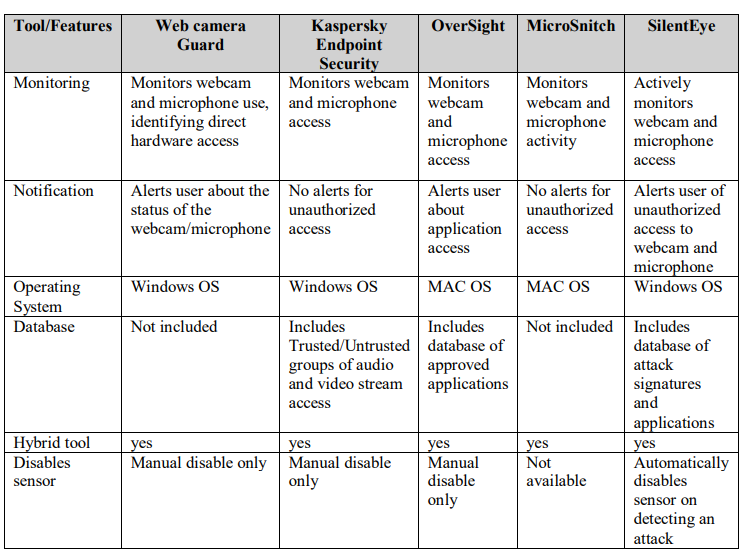
As illustrated in Table 3, existing hybrid tools exhibit varying degrees of monitoring and notification capabilities but are often constrained by the need for manual sensor disabling and the absence of comprehensive attack databases. JSilentEye is uniquely positioned as a hybrid detection solution, seamlessly integrating active monitoring, automated responses, and a comprehensive attack database for both webcams and microphones.
This innovative hybrid approach bridges the critical gaps left by existing tools, offering proactive notifications, adaptive monitoring, and seamless integration to ensure robust protection against evolving security threats. SilentEye’s hybrid detection approach addresses the critical gaps identified across web camera, microphone, and hybrid detection tools. By integrating features such as active monitoring, automated responses, and a comprehensive attack database, SilentEye offers a unified solution that combines the strengths of these tools while overcoming their limitations. This holistic approach ensures robust protection against unauthorized access, setting SilentEye apart as a pioneering framework in privacy and security.
4.2. Highlighting SilentEye’s Contributions
SilentEye introduces a pioneering approach to privacy protection by effectively detecting and preventing unauthorized access to webcams and microphones. Its robust monitoring system continuously observes these sensors for potential threats, automatically disabling compromised devices when necessary.
A key component of SilentEye’s innovation is its custom database, designed to quickly identify common attack patterns and notify users of detected threats. This database, coupled with the system’s alert mechanism, enhances SilentEye’s capability to respond proactively to emerging risks.
Moreover, the built-in permission manager empowers users by enabling them to customize sensor access for specific applications. It also provides seamless integration with device settings, ensuring users can quickly manage permissions. SilentEye further distinguishes itself with its detailed incident logging feature, which records previous access attempts and user responses. This comprehensive logging fosters greater transparency and control, reinforcing users’ ability to safeguard their privacy.
By integrating these features into a hybrid detection tool, SilentEye not only addresses the limitations of existing solutions but also offers a unified system capable of managing both webcams and microphones. Its proactive, user-focused design positions SilentEye as a standout solution in the realm of privacy protection.
5. METHODOLOGY
To effectively safeguard user privacy and security, SilentEye employs a multifaceted methodology designed to detect and respond to unauthorized access attempts targeting webcams and microphones. This section outlines the underlying workflows, core components, and system architecture that enable SilentEye to provide quick protection. By integrating advanced monitoring mechanisms, a robust notification system, and a dynamically adaptive database, SilentEye delivers a seamless and proactive approach to mitigating evolving threats. The methodology combines technical precision with user-centric design, ensuring both comprehensive protection and intuitive interaction for users.
5.1. SilentEye Workflow
SilentEye is an advanced privacy protection tool designed to detect and prevent unauthorized access to webcams and microphones on personal computers. It provides a critical layer of defense by integrating active monitoring, proactive user notifications, and adaptive threat response mechanisms.
At the core of SilentEye’s functionality is a predefined database that includes common attack patterns targeting webcams and microphones, alongside a catalogue of applications installed on the user’s device. This database serves as the foundation for SilentEye’s ability to identify and respond to potential security threats, ensuring users remain protected against unauthorized access.
Hybrid Access Detection
SilentEye’s hybrid access detection system further enhances its effectiveness by actively monitoring both webcams and microphones simultaneously. This dual-layered approach ensures comprehensive protection, particularly against sophisticated attacks targeting multiple devices. When unauthorized access is detected, the system immediately disables the compromised sensor and notifies the user with actionable options. For unrecognized applications, SilentEye dynamically prompts the user to accept or deny access, updating its database to adapt to evolving threats.
Unauthorized Access Workflow
The flowchart in Figure 2 illustrates SilentEye’s structured process for detecting and responding to unauthorized access attempts targeting webcams and microphones. This workflow highlights the system’s active monitoring, cross-referenjcing of database entries, immediate response mechanisms, and user interaction for threat mitigation. The accompanying pseudocode further illustrates the underlying logic driving these operations.

Figure 1.. Flowchart for Unauthorized Access Attempts from Known Applications and Attacks
SilentEye’s process begins with continuous monitoring of webcam and microphone access. Upon detecting activity, the system cross-references its database to verify whether the access matches known attacks or unauthorized usage patterns. If an unauthorized access attempt is identified, SilentEye immediately disables the compromised sensor and notifies the user. The user is then presented with the option to deny future access to the offending application. SilentEye facilitates this action by redirecting the user to the permission manager, where access settings can be updated.
5.2. Core Components
SilentEye’s architecture is built on a set of technical components that work in unison to provide seamless, efficient protection against unauthorized access to webcams and microphones. These components are meticulously designed to ensure comprehensive monitoring, threat detection, and response to security risks. The key elements of SilentEye include:
User Interface (UI): A Python-based graphical interface that enables intuitive user interaction with the system, making it simple to manage permissions and review logs.
Device Monitoring: Background processes powered by PowerShell scripts continuously track device activity to detect unauthorized access.
Disabling Mechanism: Automated scripts immediately deactivate compromised sensors upon detecting unauthorized access attempts, ensuring prompt threat mitigation.
Notification Mechanism: A seamless integration of PowerShell with Python facilitates timely user notifications, providing actionable insights into detected threats.
Database: A robust MySQL database stores critical information such as attack signatures, application details, and user-defined preferences, supporting dynamic system adaptability.
Each of these components plays a vital role in SilentEye’s design, contributing to a unified system that ensures robust protection against security threats. Exploring their individual functionalities provides insight into how they collectively enable SilentEye’s proactive and comprehensive defense framework.
5.2.1. Detection Architecture: PowerShell scripts and detection logic
The detection architecture of SilentEye leverages a combination of PowerShell scripts and custom logic to actively monitor and secure webcams and microphones. This integration enables active access monitoring and swift responses to unauthorized activity through several key functionalities:
1. Monitoring Mechanism
PowerShell Integration: SilentEye employs PowerShell scripts to interact with the operating system’s APIs, enabling continuous monitoring of webcam and microphone activity. These scripts run continuously in the background, detecting active device states.
Device State Analysis: The scripts assess the status of webcams and microphones, identifying whether they are in use and determining the application by accessing them.
2. Threat Detection
Database Cross-Referencing: When a device access attempt is detected, the system checks
against a predefined database containing:
Recognized attack patterns targeting webcams and microphones.
Authorized applications and their associated permissions.
Anomaly Detection Logic: SilentEye integrates both anomaly-based and signature-based detection techniques to identify unauthorized or suspicious activities with high precision.
3. Automation and Responsiveness
SilentEye’s detection architecture is designed to take immediate action against unauthorized access, with PowerShell scripts playing a central role in automating these responses:
Disabling the Compromised Device: Webcams or microphones are deactivated instantly to neutralize the threat.
Trigger Notifications: PowerShell scripts trigger alerts through the integrated GUI, providing details of the suspicious activity and suggested actions.
Incident Logging: Detected threats are documented in the database for future analysis and reference.
4. Code Execution Flow
The system operates seamlessly with the following workflow:
System Initialization: PowerShell scripts initiate monitoring upon startup
Access Detection: A continuous loop checks for changes in device state.
Verification: Detected access is cross-referenced with the database.
5. Action Trigger: If unauthorized access is detected:
The affected device is disabled
The event is logged.
The user is notified with actionable options to manage the threat.
6. Benefits of the Architecture
Scalability: The modular design ensures adaptability, allowing seamless updates for emerging threats and new applications.
Efficiency: The lightweight PowerShell scripts minimize resource usage, ensuring system performance remains unaffected while maintaining robust monitoring capabilities.
5.2.2. Notification System
The Notification System in SilentEye is a critical component designed to promptly alert users about unauthorized access attempts to their webcams or microphones. It is engineered to deliver quick notifications that enable swift action, ensuring comprehensive threat mitigation.
Key Components of the Notification System
1. Monitoring Trigger:
SilentEye’s detection logic, powered by PowerShell scripts, continuously monitors device activity. When unauthorized access is identified, the system activates a trigger to initiate the notification process.
2. Notification Logic:
Upon detecting an access attempt, the system cross-references the event with its database of known attacks and authorized applications. If the access attempt is unauthorized or from an unknown source, the system generates an immediate alert. This ensures the user is informed of potential threats as they occur.
3. Notification Content:
Alerts are designed to provide actionable insights about the detected access attempt, including:
The application attempting access.
The type of device (webcam or microphone) being accessed.
Recommended actions such as (deny access, review permissions).
The notification may also include a direct link to the SilentEye permission manager for
immediate action.
4. Delivery Mechanisms
SilentEye ensures notifications are both timely and accessible through multiple delivery methods:
GUI Notifications: Alerts are displayed within the SilentEye application’s Python-based graphical interface, allowing users to interact with the notification such as (block access, allow temporarily).
System-Level Notifications: For uninterrupted functionality, the notification system integrates with the operating system to display pop-up alerts. These ensure users are informed even when the SilentEye application is minimized or running in the background.
5. Actionable Features
SilentEye notifications are user-centric, offering the following options:
- Immediate actions, such as blocking the application or updating its permissions
- A seamless redirection to the permission manager for managing future access
preferences.
6. Logging Mechanism
Each notification event is systematically logged in the database for audit and analysis. Logged details include:
- The application involved.
- The device was accessed (webcam or microphone)
- User actions taken in response to the notification
Workflow for Notification Generation
The notification process operates in a structured flow to ensure reliability and user responsiveness:
- Trigger Event: Device access is detected by monitoring scripts.
- Verification: Access details are cross-checked against the database of known attacks and
authorized applications. - Decision: If access is unauthorized or unknown, the system generates and sends an alert.
- User Interaction: Users respond to the alert through provided options, such as denying or
allowing access. - Logging: The event and user response are recorded for future reference and database
enhancement.
Benefits of SilentEye’s Notification System
- User-Centric Design: Provides clear and actionable options to address and mitigate
threats. - Seamless Integration: Notifications are delivered effectively regardless of the
application’s state, ensuring users remain protected at all times.
5.2.3. Database Integration: Data storage and retrieval mechanisms.
The Database Integration module is a critical aspect of SilentEye’s architecture, responsible for managing data related to device access, attack patterns, and application permissions. Through structured storage and dynamic updates, the database ensures robust functionality and enhanced security.

Figure 2.. Flowchart for Unknown Application Access Attempt
The process depicted in the flowchart outlines SilentEye’s approach to handling access attempts from unknown applications:
1. Continuous Monitoring: SilentEye actively monitors access to webcams and microphones.
2. Database Check: When an application attempts to access a sensor, the system queries its database:
- The application is added to SilentEye’s database.
- The affected sensor (webcam/microphone) is immediately disabled.
- A notification is sent to the user detailing the access attempt.
3. User Prompt: SilentEye prompts users to allow or deny future access, redirecting them to the permission manager for immediate adjustments if access is denied.
4. Event Logging: The system logs the incident, enriching its database for improved detection and response to future threats.
This adaptive workflow enables SilentEye to respond effectively to both known and unknown threats, ensuring comprehensive protection for users.
6. IMPLEMENTATION
The implementation of SilentEye represents the practical realization of its core objectives: providing robust protection against unauthorized access to webcams and microphones. This section outlines the prototype’s features, integration processes, and underlying technologies that enable SilentEye to deliver its comprehensive security capabilities. By combining advanced monitoring tools, a user-centric interface, and dynamic database management, SilentEye achieves seamless functionality and establishes a foundation for future enhancements.
6.1. SilentEye Prototype
The SilentEye prototype was developed as a functional and user-friendly tool to detect and respond to unauthorized access to webcams and microphones. Serving as a proof of concept, the prototype integrates various technologies and features to achieve its security and usability objectives. These features include a user interface (UI), a monitoring system, a notification system, database integration, and log file management.
7. EXPECTED RESULTS
The implementation of SilentEye addresses critical gaps in webcam and microphone access monitoring, providing users with robust privacy and security solutions. While formal testing and evaluation are pending, the theoretical framework and design of the system suggest significant advantages in combating unauthorized access. These benefits are categorized as follows:
1. Unauthorized Access Detection: SilentEye employs continuous monitoring to scrutinize applications attempting to access webcams and microphones.
2. Immediate Disabling of Access: Upon detecting unauthorized activity, SilentEye takes immediate action by disabling the compromised device.
3. Comprehensive Alert System: SilentEye’s advanced notification mechanism enhances user awareness.
4. Enhanced Privacy Protection: By mitigating risks associated with unauthorized access, SilentEye provides a robust safeguard against privacy breaches.
8. LIMITATIONS
While SilentEye is a promising tool for safeguarding user privacy, it is important to acknowledge its current limitations. These challenges highlight areas for future improvement, shaping the development roadmap to enhance the system’s reliability, scalability, and ethical alignment.
8.1. System Design Constraints
SilentEye’s current design introduces certain constraints that may impact its usability and effectiveness:
Platform Dependence: The system is presently restricted to Windows OS, limiting its application on other platforms such as macOS, Linux, and mobile devices.
Database Scope: The preloaded database focuses on common attack signatures and known applications, leaving the system less effective against emerging or novel threats.
Notification Timing: Notifications are not delivered in real time but are triggered once the system processes detected activity. Although minor, this delay may hinder immediate user responses to critical threats.
8.2. Technical Constraints
Several technical challenges may arise during the deployment and operation of SilentEye:
1. False Positives:
- Legitimate applications might be incorrectly flagged as threats, leading to unnecessary notifications or interruptions in workflows.
- High false positive rates could reduce user trust in the system.
2. Compatibility Issues:
- Windows-specific APIs form the backbone of the current design, posing challenges when adapting SilentEye to other platforms.
- Variability in hardware configurations and driver compatibility may affect system performance.
3. Resource Usage:
- Continuous monitoring and database cross-referencing require system resources, potentially impacting performance on older or resource-constrained devices.
4. Dynamic Threat Landscape:
Attackers constantly evolve their techniques, necessitating frequent updates to SilentEye’s database and detection logic to maintain effectiveness.
8.3. Ethical Considerations
As a privacy-focused tool, SilentEye raises important ethical considerations that require careful management:
1. Privacy Implications:
- Although designed to protect privacy, storing data on application access patterns might inadvertently expose sensitive user behaviour.
- Unauthorized access or mismanagement of the database could result in privacy breaches.
2. Potential Misuse:
- SilentEye’s ability to automatically disable webcams and microphones could be exploited if the system or its database is compromised.
- In organizational settings, the tool might be used for employee monitoring, raising concerns about surveillance and workplace ethics.
3. User Autonomy:
- Automated responses may limit user control over device functions, frustrating users who rely on certain applications for critical tasks.
8.4. Future Work
Although SilentEye presents an improved solution for enhancing user security and privacy, some future improvements should include the following:
- Expand cross-platform compatibility to include macOS, Linux, and mobile devices.
- Enhance database functionality by integrating AI and machine learning to dynamically detect and adapt to emerging attack patterns.
- Develop real-time notification mechanisms to ensure immediate user awareness of threats.
- Implement robust encryption and access control measures to secure sensitive data.
- Refine detection algorithms using user feedback to reduce false positives and improve
accuracy.
By addressing these improvements and proactively planning for mitigation strategies, SilentEye can evolve into a scalable, user-centric, and ethically responsible solution for securing user privacy.
9. CONCLUSION
In an era where digital privacy and security are increasingly compromised, SilentEye stands out as a pioneering tool designed to safeguard users against unauthorized access to webcams and microphones. By integrating active monitoring, automated responses, and dynamic database adaptability, SilentEye not only fills critical gaps left by existing solutions but also sets a new benchmark in hybrid access detection. Its modular architecture, encompassing robust monitoring, notification systems, and a user-friendly permission manager, empowers users to take control of their privacy with confidence.
SilentEye’s contributions extend beyond technical innovation. It introduces a comprehensive, adaptive framework that proactively counters evolving cybersecurity threats. Its ability to combine OS-level integration with user-centric features demonstrates its role as a transformative force in advancing cybersecurity and digital privacy. By addressing both known and emerging threats, SilentEye ensures that users are equipped with a reliable and forward-thinking defence mechanism in an increasingly connected world.
Looking ahead, SilentEye’s potential for growth is immense. With plans for cross-platform compatibility, AI-driven threat detection, and enhanced user experience, it is poised to remain at the forefront of cybersecurity innovation. SilentEye represents more than a tool—it is a proactive vision for a future where privacy is protected, and users can navigate the digital world securely and confidently.
ACKNOWLEDGEMENTS
The Vice Presidency funded this research/project for Graduate Studies, Research, and Business (GRB) at Dar Al-Hekma University, Jeddah. The authors, therefore, acknowledge GRB’s technical and financial support with thanks.
REFERENCES
[1] W. by Cologix, “Cyber smarts series: Webcam and microphone risks,” Cologix Blog, Apr. 10, 2024.
[Online]. Available: https://cologix.com/resources/blogs/cyber-smarts-webcam-microphone-risks/
[2] Xcitium, “Detection definition and meaning in cyber security,” Xcitium, Jan. 25, 2023. [Online].
Available: https://www.xcitium.com/detection-definition/
[3] Isarsoft, “What is unauthorized access detection? Unauthorized access detection meaning,” Isarsoft
Knowledge Hub, n.d. [Online]. Available: https://www.isarsoft.com/knowledge-hub/unauthorizedaccess-detection
[4] J. Sammons and M. Cross, The Basics of Cyber Safety: Computer and Mobile Device Safety Made
Easy. Syngress, 2017.
[5] P. Abimbola, “Understanding webcams: Types, uses, and differences,” Promallshop Official Blog,
Sep. 12, 2024. [Online]. Available: https://blog.promallshop.com/2024/06/07/understandingwebcams-types-uses-and-differences/
[6] T. Editors, “Microphone,” Encyclopaedia Britannica, Jul. 26, 2024. [Online]. Available:
https://www.britannica.com/technology/microphone-electroacoustic-device
[7] Norton, “Webcam hacking: How to spot and prevent an intrusion,” Norton Blog, n.d. [Online].
Available: https://us.norton.com/blog/malware/webcam-hacking
[8] D. Bodnar, “Webcam security: How to stop your camera from being hacked,” Avast Blog, Feb. 23,
2023. [Online]. Available: https://www.avast.com/c-webcam-security
[9] G. D. Maayan, “5 user authentication methods that can prevent the next breach,” ID R&D, Dec. 28,
2022. [Online]. Available: https://www.idrnd.ai/5-authentication-methods-that-can-prevent-thenext-breach/
[10] Fortinet, “What is access control?” Fortinet Cyber Glossary, n.d. [Online]. Available:
https://www.fortinet.com/resources/cyberglossary/access-control
[11] Promallshop, “Understanding webcams: Types, uses, and differences,” Promallshop Official Blog,
Sep. 12, 2024. [Online]. Available: https://blog.promallshop.com/2024/06/07/understandingwebcams-types-uses-and-differences/
[12] Livestorm, “Video conferencing solutions for hybrid workspaces,” Livestorm Resources, n.d.
[Online]. Available: https://livestorm.com/resources/video-conferencing-tools
[13] W. Huang, W. Tang, H. Chen, H. Jiang, and Y. Zhang, “Unauthorized microphone access restraint
based on user behavior perception in mobile devices,” IEEE Trans. Mobile Comput., vol. 23, no. 1,
pp. 955–970, 2022.
[14] Microphone Lock, “Locking microphone access to prevent eavesdropping,” Microphone Security Resources, n.d. [Online]. Available: https://microphonelock.com/features
[15] Avira, “Webcam hacking: Protect your webcam from hackers,” Avira Blog, Oct. 7, 2024. [Online]. Available: https://www.avira.com/en/blog/webcam-hacking-how-to-protect-yourself-from-hackers
[16] Verizon, “How to prevent camera hacking on your phone and laptop while remote working,” Verizon Business Blog, Nov. 19, 2020. [Online]. Available:
https://www.verizon.com/business/resources/articles/s/how-camera-hacking-threatens-remoteworkers-and-their-organizations/
[17] Trend Micro, “Spyware detection and prevention techniques,” Trend Micro Security Blog, Dec. 13,
2021. [Online]. Available: https://www.trendmicro.com/vinfo/us/security/news/cybercrime-anddigital-threats
[18] W. Huang, W. Tang, H. Chen, H. Jiang, and Y. Zhang, “Unauthorized microphone access restraint
based on user behavior perception in mobile devices,” IEEE Trans. Mobile Comput., vol. 23, no. 1,
pp. 955–970, 2022.
[19] G. Petracca, Y. Sun, T. Jaeger, and A. Atamli, “AuDroid: Preventing attacks on audio channels in
mobile devices,” in Proc. 31st Annu. Comput. Security Appl. Conf., 2015, pp. 181–190.
[20] Kaspersky, “Webcam and microphone security features,” Kaspersky Resource Center, n.d. [Online].
Available: https://www.kaspersky.com/resource-center/threats/spyware
[21] Oversight, “Webcam and microphone monitoring for Mac,” The Eclectic Light Company, n.d.
[Online]. Available: https://eclecticlight.co
[22] Objective Development, “MicroSnitch overview,” Objective Development Software, 2023. [Online].
Available: https://www.obdev.at
[23] WebCam Guard, “Access monitoring for webcams and microphones,” Security Tools Database, n.d. [Online]. Available: https://www.security-tools.org
[24] R. Farley and X. Wang, “Roving bugnet: Distributed surveillance threat and mitigation,” Computers & Security, vol. 29, no. 5, pp. 592–602, 2010.
[25] T. Germain, “How to protect yourself from camera and microphone hacking,” Consumer Reports, n.d. [Online]. Available: https://www.consumerreports.org
[26] Y. Liu, Z. Xiang, E. J. Seong, A. Kapadia, and D. S. Williamson, “Defending against microphonebased attacks with personalized noise,” Proc. Privacy Enhancing Technol., 2021.
[27] W. Stallings, Network Security Essentials: Applications and Standards, 6th ed., Pearson Education, 2019.
[28] Symantec, “Ransomware: The evolving threat,” Symantec Security Reports, 2022. [Online]. Available: https://www.symantec.com/security-center
[29] S. Gibson and D. Liu, “Trends in hybrid cybersecurity tools: A review of gaps and opportunities,” J. Cybersecurity Res., vol. 15, no. 3, pp. 245–263, 2020.
AUTHORS

 International Journal of Computer Networks & Communications (IJCNC)