
IJNSA 07
A COMPREHENSIVE ANALYSIS OF NETWORK SCANNING AND SECURITY ASSESSMENT TOOL
Archita1 and Ruchi Tuli2
1Undergraduate Student, Department of Computer Science & Engineering, Netaji
Subhash University of Technology, New Delhi (India)
2Department of Computer & Information Technology, Jubail Industrial College, Jubail,
Kingdom of Saudi Arabia
ABSTRACT
An essential component of any network pen testing effort is network reconnaissance. Gaining additional knowledge about the target’s network will help us understand its infrastructure as well as any potential attack routes and exploits that could expose vulnerabilities. By employing both passive and active reconnaissance methods and tools, an attacker can possess substantial volumes of data with a reduced likelihood of being discovered. NMAP, short for Network Mapper, is a widely recognized and powerful open-source network scanning and security assessment tool. This research study analyzes NMAP, including its background, features, usage, and impact on network security. The research also explores the ethical issues of employing NMAP and suggests strategies to avoid such hazards.
KEYWORDS
NMAP, network, vulnerability, network security, network mapping, intrusion detection.
1. INTRODUCTION
Nmap (“Network Mapper”) is an open-source tool for network exploration and security auditing [1]. It is effective against single hosts, although it was intended to quickly scan big networks.Nmap makes use of raw IP packets to identify hosts on a network, the services (name and version of the application) they provide, the operating systems (and OS versions) they run, the kinds of firewalls and packet filters they have in place, and a plethora of other features. Although Nmap is frequently used for security audits, a lot of systems and network administrators also find it helpful for other typical tasks like managing service upgrade schedules, taking inventory of the network, and keeping an eye on host or service uptime.
Depending on the choices selected, Nmap will produce a list of all the targets it has scanned along with additional information about each one. Among such details, the “interesting ports table” is crucial. The service name, status, port number, and protocol are listed in that table. Nmap may reveal further details about targets, such as reverse DNS names, operating system guesses, device types, and MAC addresses, in addition to the fascinating ports table. Basic working of NMAP is shown in Figure 1

Figure 1. Basic working of NMAP
Nmap begins by determining which hosts are active on the network by sending ICMP echo requests (ping) or scanning specific ports. After identifying active hosts, Nmap can optionally do reverse DNS lookups to map IP addresses to domain names. It is capable of providing more meaningful and human-readable information in scan results. Following that, Nmap scans the ports on the target hosts to detect whether they are open, closed, or filtered. After detecting open ports, Nmap attempts to discover the type of services or apps operating on them. It probes open ports to gather the information on the versions of services running on them. It can also perform operating system detection by sending specific packets and analyzing the responses to determine the OS of the target host. Nmap supports scripting through the Nmap Scripting Engine (NSE), which enables sophisticated scanning and vulnerability detection. Finally, Nmap provides detailed reports on discovered hosts, open ports, operating systems, identified services, and potential vulnerabilities [1].
1.1. Background and History of NMAP
Nmap, a powerful network scanning tool, was created by Gordon Lyon, also known as Fyodor. NMAP was released as a simple Linux-only port scanner in 1997 and was capable of identifying open ports on target hosts. The tool quickly gained popularity due to its efficiency and ease of use. Early versions introduced features like OS detection and service version identification, enhancing its capabilities. In the years 2001-2010, the introduction of NSE revolutionized Nmap, allowing users to create custom scripts for various tasks, including vulnerability scanning, service fingerprinting, and more. Nmap became available on multiple platforms, including Windows, Linux, and macOS, expanding its reach. Over the next 16+ years it sprouted a myriad of valuable features, including OS detection, version detection, the Nmap Scripting Engine, a Windows port, a graphical user interface, Ncat, Nping, Ndiff, and more [2]. Codetalker Digest, Linux Journal, Info World, and LinuxQuestions.Org all named Nmap the “Security Product of the Year.” It was even included in twelve different movies, including The Bourne Ultimatum, Die Hard 4, Girl with the Dragon Tattoo, and The Matrix Reloaded [2]. Nmap continues to evolve with regular updates, adding new features and improving performance. Nmap can be integrated with other security tools and frameworks to create comprehensive network security solutions.
1.2. Purpose and Scope of Paper
This research paper aims to provide comprehensive analysis of NMAP, exploring its background, features, usage and impact on network security. The paper will also discuss the ethical implications of using NMAP and address countermeasures that organizations can implement to mitigate the potential risks. This paper is divided into various sections. Section 2 discusses features & capabilities; section 3 discusses the usage and applications of NMAP. In section 4, ethical considerations are discussed. NMAP and network security are discussed in section 5.Section 6 discusses countermeasures against NMAP and lastly, we present the conclusion in section 7.
2. FEATURES AND CAPABILITIES OF NMAP
Nmap runs from a host system and conducts carefully controlled scans of target hosts, subnets and networks. It gathers information like IP addresses, port status, operating systems and more. This section of the paper explains the features and capabilities of NMAP.
2.1. Port Scanning
Nmap generates a comprehensive report detailing the detected ports, along with associated state information. There are four possible states these ports can be in. Open” denotes ports actively listening for incoming connection requests, promptly responding to these requests. Conversely, “Closed” ports appear accessible to the scanner but do not respond to connection attempts, indicating no active service. “Filtered” ports, on the other hand, are those that Nmap tried to scan but encountered interference from a firewall, obscuring their status. Lastly, “Unfiltered” ports are accessed by Nmap, yet the tool couldn’t definitively determine whether the ports were open or closed for some inexplicable reason [3].
There are two distinct possibilities that are worth mentioning. Sometimes the exact condition of a port is unknown to Nmap. Under such circumstances, Nmap displays two reasonable possibilities that it is unable to discern between. Ports labelled “Closed|Filtered” suggest that they may be either closed or filtered, whereas ports labelled “Open|Filtered” indicate that they may be either open or filtered. For network administrators and security experts trying to understand the nuances of their network’s security posture, these subtle differences are crucial [3].
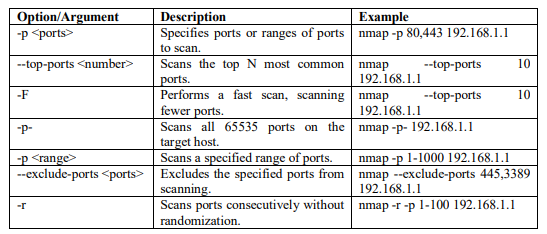
Nmap scans only the 1000 most common ports for each protocol. Additional ports to scan can be specified by using the -p option. You can obtain additional information about the port specifications and scan order from Port Specification and Scan Order [4]. Table 1 shows the most used options for port scanning.
Table 1: Common port scanning options used with NMAP
2.2. OS Fingerprinting
The -O option in Nmap is used to do OS detection. With the use of this functionality, Nmap may infer the target host(s)’ operating system from idiosyncrasies in their TCP/IP stack behaviour. Based on a database of recognized signatures, Nmap uses a sequence of TCP and UDP packets sent to the target and an analysis of the returned data to determine the operating system.
Up to 16 probes can be sent to the target during the operation, and the responses are analysed. The probes differ in terms of UDP payloads, TCP options, TCP flags, and other features that are handled slightly differently by various operating systems [4]. Figure 2 shows the usage of command for detecting the OS
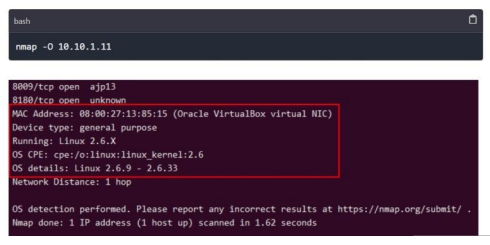
Figure 2: OS Fingerprinting using NMAP
2.3. Service & Version detection
Nmap extends its analytical prowess by delving deeper into the examination of services operational on a given target. The technique known as service version detection employs methodologies akin to those employed in operating system detection, aiming to unearth comprehensive details about the service active on a particular port. Nmap diligently collects data from the service banner and observes network behaviour, striving to pinpoint the precise software in operation on that specific port. In addition to identifying the software, Nmap strives to ascertain its version number, and this feature can be activated by employing the “-sV” flag in your command [3]. Figure 3 below shows the command that is used for Service and version detection.

Figure 3: NMAP command for service & Version detection
This command scans the target host 10.10.1.11 for open ports and attempts to identify the services running on those ports along with their version numbers. Nmap accomplishes this by delivering a sequence of queries intended to elicit replies from recognized services. The responses are then compared against a database of signatures to determine the service type and version [4].

Figure 4: Service & Version detection
2.4. Scripting Engine
Nmap allows you to write custom scripts to automate tasks and gather more detailed information about discovered hosts and services. NMAP Scripting Engine (NSE) offers a library of prewritten scripts (written in Lua) that can be used for various purposes like version detection, vulnerability detection, services enumeration & exploitation. NSE scripts are written in Lua and can be used for various purposes, such as gathering additional information about the network, exploiting vulnerabilities, or even detecting and evading IDS/IPS systems. Scripts are categorized into several categories, including safe, intrusive, malware, exploit, and vuln, among others [4] [5]. Table 2 shows the commands used with NSE [4] [6].
Table 2: NMAP script scan


2.5. Host Discovery
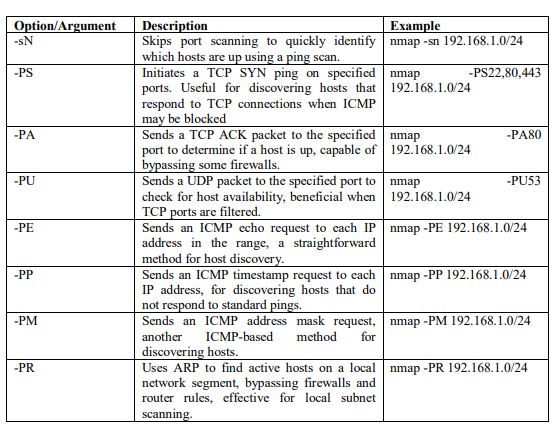
A host discovery scan is one of the most common types of scans used to enumerate hosts on a network because it can use several types of ICMP messages to determine whether a host is online and responding on a network [4]. The default for the -sN scan option is to send an ICMP echo request packet to the target, a TCP SYN to port 443, a TCP ACK to port 80, and an ICMP timestamp request. If the target responds to the ICMP echo or the aforementioned packets, then it is considered alive. Such a scan for host discovery of an entire subnet is sometimes referred to as a ping sweep. Table 3 contains the list of different options which can be used for host discovery.
Table 3: Host discovery with NMAP
3. NMAP USAGE AND APPLICATIONS
NMAP is a Swiss army knife for network security and serves as a workhorse for various network
related tasks. Given below are the usage and application areas of NMAP.
3.1. Network security auditing
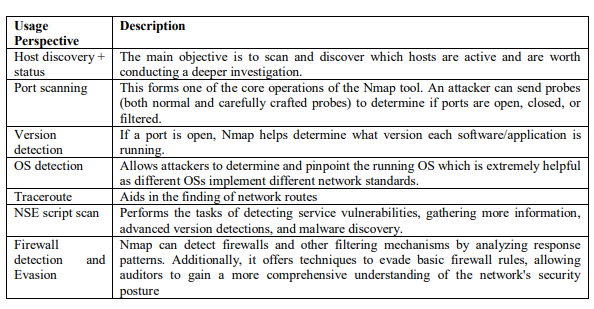
Table 4 below shows the usage of NMAP in the area of network security and auditing [7].
Table 4: NMAP usage in network security auditing
3.2. Penetration Testing
NMAP is used in Penetration testing for performing the following tasks –
- Information Gathering: Nmap is a crucial tool in the initial information gathering phase of penetration testing. The information it gathers about active hosts, ports, services, and operating systems forms the basis for further vulnerability discovery and exploitation attempts.
- Vulnerability Scanning: Nmap can be used with scripting engines to automate vulnerability scanning. These scripts leverage known vulnerabilities in specific services and versions to identify potential weaknesses.
- Exploitation: While not directly an exploitation tool, Nmap can provide valuable information to guide the selection of appropriate exploits based on the discovered vulnerabilities.
3.3. System Administration
Given below is the usage of NMAP in the area of system administration –
- Network Inventory: Nmap helps network administrators maintain an up-to-date inventory of devices on their network. This allows them to track changes, identify unauthorized devices, and manage network resources effectively.
- Service Monitoring: Nmap can be used to monitor the availability and responsiveness of critical network services. This helps administrators identify potential service disruptions and troubleshoot network issues.
- Network Troubleshooting: By analyzing Nmap scan results, administrators can diagnose network connectivity problems and identify bottlenecks.
3.4. Research and Education
In the field of research and education, NMAP can be used for –
- Network Security Fundamentals: Nmap is a valuable tool for teaching network security concepts like port scanning, service identification, and firewall evasion. Its opensource nature allows students to experiment and gain hands-on experience.
- Vulnerability Research: Researchers can use Nmap to scan large networks and identify new vulnerabilities in specific services or operating systems.
- Network Protocol Analysis: Nmap can be used to analyze network protocols and understand how different services communicate.
4. ETHICAL CONSIDERATIONS
NMAP is an immensely powerful tool, but it can be misused as well. Given below are some ethical considerations for using NMAP
4.1. Legitimate uses of NMAP
NMAP, a powerful network scanning tool, has several legitimate uses, including:
- Network Mapping: NMAP can be used to map and discover network topology, identify active hosts, and gather information about network devices.
- Network Security Auditing: It can be used to assess the security of a network by scanning for open ports, vulnerabilities, and potential security risks.
- Network Troubleshooting: NMAP can help identify network connectivity issues, misconfigured devices, or firewall problems.
- Network Inventory Management: It can assist in maintaining an inventory of network devices, their services, and configurations.
4.2. Legal and Ethical implications
When using NMAP, it is important to consider the legal and ethical implications:
- Legal Considerations: It is crucial to ensure that the use of NMAP complies with applicable laws and regulations. Unauthorized scanning of networks or devices without proper permission is illegal in many jurisdictions. Respect the terms of service of internet service providers and network providers.
- Ethical Use: NMAP should be used responsibly and ethically. It is important to obtain proper authorization before scanning any network, respecting the privacy and security of others.
- Permission and Consent: Proper permission should be sought from network administrators or owners before scanning their networks. Any terms of service, acceptable use policies, or legal agreements should be respected. A written agreement can help define the scope of the scan, the expected outcomes, and any limitations.
- Data Protection: Collecting or storing sensitive information during the scanning process should be avoided. Any obtained data should be handled with care and appropriate data protection practices should be followed. Scanning personal networks or systems without explicit consent should be refrained.
- Educational Use: Nmap should be used for educational purposes, such as learning network security concepts and practicing penetration testing techniques. Skills can be enhanced by participating in ethical hacking challenges and competitions so as to contribute to the security community.
- Responsible Disclosure: If any vulnerability is discovered during a scan, it should be reported responsibly to the affected organization. A good collaboration with the vendor will help to develop a patch or fix for the vulnerability.
By understanding and adhering to legal and ethical guidelines, NMAP can be a valuable tool for network administrators and security professionals to ensure the safety and integrity of networks.
5. NMAP AND NETWORK SECURITY
NMAP can be widely used for network security purposes. It provides a range of features that can help in vulnerability assessment, intrusion detection and prevention, and network hardening.
5.1. Vulnerability Assessment
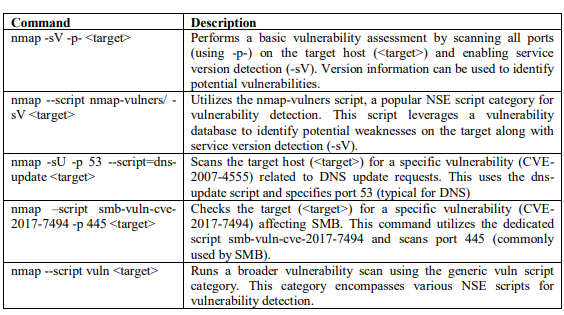
NMAP can be used to identify potential vulnerabilities in a network by scanning for open ports, services, and operating systems running on target systems. It can also detect outdated software versions or misconfigurations that may leave the network vulnerable to attacks. By identifying these vulnerabilities, security teams can respond appropriately to patch or fix them, reducing the risk of exploitation. Table 5 shows the commands used by NMAP for vulnerability assessment.
Table 4: NMAP commands for vulnerability assessmen
5.2. Intrusion Detection & Prevention
NMAP can be used as a part of an intrusion detection system (IDS) or intrusion prevention system (IPS). It can be employed to monitor network traffic and detect any unauthorized or suspicious activities. NMAP can perform various scans like SYN scan, UDP scan, or TCP connect scan to identify potential threats or unauthorized access attempts. By integrating NMAP with other security tools and systems, organizations can enhance their ability to detect and respond to security incidents.
5.3. Network Hardening
NMAP can help in network hardening by identifying open ports, services, and configurations that can be exploited by attackers. It can scan for unnecessary or insecure services running on network devices and recommend necessary steps to secure them. NMAP can also perform firewall and network device configuration audits to ensure that they are properly configured to prevent unauthorized access.
5.4. Risk Mitigation Strategies
To mitigate the risks associated with network security, it is important to follow certain strategies:
- Regular Vulnerability Scanning: Conducting regular NMAP scans to identify vulnerabilities and weaknesses in the network infrastructure.
- Patch Management: Keeping the network devices and software up to date with the latest security patches and updates to address known vulnerabilities.
- Network Segmentation: Implementing network segmentation to separate critical assets from the rest of the network, reducing the potential attack surface.
- Access Control: Implementing strong access controls, such as proper authentication mechanisms, role-based access control, and least privilege principles, to restrict unauthorized access.
- Intrusion Detection and Prevention Systems: Deploying IDS/IPS systems along with NMAP to detect and prevent unauthorized access attempts or suspicious activities.
- Security Awareness Training: Educating employees about potential security risks, best practices, and the importance of following security policies and procedures.
- Incident Response Plan: Developing an incident response plan that outlines the steps to be taken in case of a security incident and conducting regular drills to ensure preparedness.
By utilizing NMAP for vulnerability assessment, intrusion detection and prevention, and implementing effective risk mitigation strategies, organizations can enhance their network security posture and reduce the chances of successful attacks.
6. COUNTERMEASURES AND DEFENSES AGAINST NMAP
While Nmap is a valuable tool for network security assessments, it can also be used for malicious purposes by attackers trying to identify vulnerabilities in your network. Here’s a breakdown of strategies to defend against Nmap scans:
6.1. Proactive Measures
- Scan Yourself First: The network should be scanned regularly with Nmap (or similar tools) to identify open ports, services, and potential weaknesses. This proactive approach allows addressing vulnerabilities before attackers discover them.
- Close or Block Unnecessary Ports: Only essential ports should be kept open for the services needed. Any unused ports should be closed to reduce the attack surface and limit the information Nmap can reveal. Firewalls are a primary tool for achieving this.
- Patch and Update Systems: Ensure all systems on the network are updated with the latest security patches. This addresses known vulnerabilities that attackers might exploit based on information gained from Nmap scans.
- Service Version Spoofing: Some systems allow spoofing service versions to provide misleading information to Nmap scans. This can make it harder for attackers to identify specific software versions with known vulnerabilities. However, be aware that this approach might interfere with legitimate network management tools.
6.2. Using Firewalls and IDS/IPS
- Firewalls: Firewalls should be configured to block suspicious traffic patterns that might indicate Nmap scans. This can involve filtering ICMP messages, limiting port scans, and implementing rules to restrict probes.
- Intrusion Detection/Prevention Systems (IDS/IPS): An IDS/IPS can be deployed to detect and potentially block Nmap scans. These systems can identify suspicious network activity patterns and take appropriate actions.
6.3. Advanced Techniques
- Honeypots and Honeynets: Honeypots (decoy systems) should be set up that can appear attractive to attackers. These honeypots can log Nmap scans and provide valuable information about attacker tactics without compromising your real network. Honeynets are elaborate networks of honeypots designed to capture more comprehensive attacker behavior.
- Port Knocking: Implement port knocking, a technique where specific port sequences need to be accessed in a certain order to gain access to a service. This adds an extra layer of obscurity and deters automated scans. However, port knocking can introduce complexity for authorized users as well.
- IP Spoofing Detection: Systems should be configured to detect and block IP spoofing attempts, which some advanced Nmap scans, might use to evade detection.
6.4. Important Considerations.
- Escalating Arms Race: The battle between attackers and defenders is ongoing. New scanning techniques are constantly being developed to bypass traditional defenses. Stay informed about the latest Nmap features and adjust your defenses accordingly.
- False Positives: Some countermeasures might generate false positives, blocking legitimate network traffic. Carefully balance security with usability when implementing these techniques.
It’s important to note that no single defense measure can provide complete protection against NMAP or other network scanning tools. Implementing a layered defense strategy that combines multiple security measures and regular monitoring is crucial for maintaining a secure network environment. Regularly reviewing and updating security measures based on emerging threats and industry best practices is also essential.
.
7. CONCLUSION
This research paper aimed to provide a comprehensive analysis of NMAP, exploring its background, features, usage, and impact on network security. The paper also discussed the ethical implications of using NMAP and address countermeasures that organizations can implement to mitigate potential risks. NMAP is a useful, free tool that allows organizations to track their networks’ state. Running these types of scans regularly can help maintain a reasonable level of security assurance. The proactive use of host discovery, TCP scanning, operating system detection, and service version detection is essential in today’s digitalized and networked world, where threats to network security are always changing. By regularly employing these techniques, organizations can establish a solid foundation for maintaining a robust and secure network infrastructure, protecting critical data, and staying one step ahead of potential cyber threats.
REFERENCES
[1] Reconnaissance and NMAP (2021): A beginner’s guide https://shubhs0522.medium.com/reconnaissance-and-nmap-4b9d24b5dd97
[2] Nmap.org. (2009). Nmap Network Scanning—The Official Nmap Project Guide to Network Discovery and Security Scanning. [online] Available at: https://nmap.org/book/
[3] S. Wattuhewa (2023). Network Scanning with NMAP. Conference Paper.: https://www.researchgate.net/publication/374135016
[4] Deepak Prasad (2024). Network Reconnaissance using Nmap [Cheat Cheet]. https://www.golinuxcloud.com/network-reconnaissance-using-nmap/
[5] Top 10 Nmap Scripts to Unlock Network Security: https://nmap.org/nsedoc/scripts/rdp-vulnms12 020.html
[6] Nmap Scripting Engine Documentation: https://nmap.org/book/nse-usage.html
[7] Fouz Barman, Nora Alkaabi, Hamda Almenhali, Mahra Alshedi and Richard Ikuesan, A Methodical Framework for Conducting Reconnaissance and Enumeration in the Ethical Hacking Lifecycle, Proceedings of the 22nd European Conference on Cyber Warfare and Security, ECCWS 2023, pp 54-64

AUTHORS
Archita, is an undergraduate student and currently pursuing her B.Tech from Netaji Subhash Institute of science and Technology, New Delhi (India). Her research interests are the areas of Data Science and Cyberscurity.

Dr, Ruchi Tuli, is presently working as an Assistant Professor of Computer Science in the Department of Computer & Information Technology at Jubail Industrial College, Jubail, Kingdom of Saudi Arabia. She obtained her Ph.D. degree in computer science in 2011 from Singhania University. She has more than 17 years of teaching experience. She has in her credit many papers published in reputed international journals. She is also the author of 2 books – “Recovery in Mobile and ad hoc networks” and “Understanding Computer Networks.

 International Journal of Computer Networks & Communications (IJCNC)