
IJCNC 05
Evaluating the Impact of Mid-Link Bandwidth Constraints on Video Streaming Performance using Ns2
Zahraa Khazal Rashad
Department of Information Technology, Faculty of Computer Engineering, University of Valladolid, Valladolid, Spain.
Abstract
A detailed simulation study of video streaming over a simple best-effort network topology is conducted using Network Simulator 2 (NS2). The simulation involves transmitting a video stream across a simple network topology where the central link’s data rate varies to simulate different cases. The network topology consists of : node 0 (sender), node 3 (receiver), and nodes 1 and 2 as intermediate nodes. The study aims to examine the impact of mid-link bandwidth variations on packet loss during video transmission. Specifically, the mid-link connecting nodes experience bandwidth reductions to 10, 8, and 5 Mbps. By adjusting the mid-link bandwidth, we simulate scenarios that typically cause packet drops and measure the resulting packet loss for each bandwidth configuration. The simulation results provide insights into how bandwidth constraints affect video streaming performance, emphasizing the correlation between reduced mid-link capacity and increased packet drop rates. The results indicate that maintaining the video encoding constant while reducing the mid-link bandwidth to half of its required capacity results in an approximately 30% rise in dropped packets and a fivefold increase in end-to-end delay. This significant packet loss severely degrades the video quality, highlighting the importance of adequate mid-link bandwidth for maintaining high-quality transmission.
Key words
Packet drop, Packet loss, End-to-End Delay, Best-effort network topology
- Introduction
One of the most common applications over an internet network connection nowadays is multimedia streaming. Applications of multimedia streaming are diverse, including video streaming such as space channels online and video conferences [1][2]. Also, audio streaming is widely used in internet radio channels and instant messaging applications that mimic phone calls at lower costs via the internet connection. There are also well-known websites that perform video streaming, like YouTube, Netflix, Daily Vids, and many other online conferencing tools [1].
These applications use various video coding algorithms and standards, leading to differences in implementation and performance [1][3]. All these applications use the same concept but with some differences due to the variety of video coding algorithms, video standards, and other simple parameters.[4].
The quality of video streaming is heavily influenced by network performance, which is crucial for preventing corruption and frame loss during transmission. Key factors affecting network performance include bandwidth, latency, jitter, and packet loss [4]. Adequate bandwidth is essential for maintaining high-quality video streams; otherwise, the video quality deteriorates due
to the bandwidth not being enough to deliver the video to the receiver [5]. Minimizing latency and jitter ensures real-time delivery, which is vital for smooth video streaming. Moreover, high packet loss significantly degrades the video quality received at the endpoints [6][7]
Also, video encoding significantly affects packet flow over network connections. Various encoding standards, such as MPEG, HEVC, and AVI, are used to minimize the number of packets required for streaming. These codecs employ different compression algorithms to balance video quality and efficiency, enabling high-definition video streaming even over networks with limited capacity [8].
This article aimed to simulate video streaming over a simple best-effort network topology experiencing a data rate drop in the mid-link connecting to other links from the sides, as the topology of a network can significantly influence video streaming performance. Factors such as the number of hops between the source and destination and the presence of bottlenecks all play a role. This will constitute a general cause of packet drops. In real life, it can be considered any obstacle like additive white gaussian noise (AWGN), multipath fading, shadowing, and other restrictions on wireless links. It can also express any kind of congestion that can happen among any network nodes due to saturation with users’ requests that these nodes cannot satisfy totally, so that certain lines will experience weakness in delivering such multimedia streaming services, leading to packet drops.
Regardless of the numerous effects and interferences mentioned before, and since the main idea is experiencing the packet drop, the topology was implemented as simply as possible to show up this phenomenon and its effect on the delivered video visually.
First, the Network Simulator (NS2) illustrates the basic concepts of video streaming using video and image processing. In fact, NS2 is a highly powerful simulation program for both wired and wireless network communication, capable of simulating routing algorithms and protocols. It is extensively used in ad-hoc network research due to its support for a wide range of popular network protocols, providing reliable simulation results for various network types [9].
In addition to the main NS2 package, a video streaming evaluation library patch for video streaming quality research was applied. Hybrid Windows/Linux OSs were used for the sake of compatibility and the operation of some tools meant to run under the Windows OS environment. Another handy tool was used under Matlab/Windows, which is Trace Graph 2.05. It is used to analyze the trace files resulting from the NS2 simulation, which contain all of the simulation details like the number of sent packets, end-to-end delays, number of dropped packets, etc. Everything will be thoroughly explained and visually illustrated on the coming sections.
As well as, a Moving Picture Experts Group (MPEG4) video standard is simulated over the network. Due to the high compression the standard owns, it shall consume less space when saved on a permanent memory in addition to non-high bandwidth links demanding standard due to the shrinkage in size per frame when compared to other analog widely known standards [3][10].
The paper is structured as follows: The NS2 simulation standard procedure is introduced in section 2. The simulations and results of different mid-link bandwidths are presented in detail in section 3. Conclusions are summarized in section 4. Appendix A was added at the end of the article, describing each script code line used in the simulation.
2.Ns2 Simulation Standard Procedure
In the mid-1990s, a joint project between researchers at the University of California, Berkeley, Lawrence Berkeley National Laboratory (LBNL), the University of Southern California’s Information Sciences Institute (USC/ISI), and Xerox PARC, Network Simulator 2 (NS2) was first developed as part of the Virtual InterNetwork Testbed (VINT) project [9]. NS2 is commonly employed to simulate and assess network protocols and video streaming applications. This overview outlines research studies that utilize NS2 to investigate facets of video streaming, across network structures, emphasizing metrics like packet loss, end-to-end delay, and bandwidth usage [11].NS2 provides a flexible environment for network studies, including ad-hoc networks, and was designed to mimic network protocols comprehensively [9]. In fact, NS2 is an open-source tool created in C++ and the object-orinted tool command language (OTcl) that allows researchers to model and analyze complicated network situations with flexibility and extension. Moreover, NS2 may be used as a limited-functionality network emulator, enabling real-time communication with actual network configurations.
Before starting with simulation, the video is well known as a number of sequential frames with a certain number per second [6]. If the compression was not there, the video would have taken up a very large amount of space and would have consumed a much larger link bandwidth , which would be undesirable.
The sample video used here was a raw YUV video format, which is an uncompressed format with a very large size in comparison to its total number of frames or its length. So, it is not reasonable to stream such a video over the network, no matter how capable the net link and the nodes were. So, the video is encoded in a format suitable for such use, as shown below:
- The video is encoded to an Xvid MP4 format with 30 frames per second. This is done by a tool named (xvid_encraw). The exact command line was written as:
xvid_encraw -i send.yuv -w 352 -h 288 -framerate 30 -o send.m4v
This compressed file size is from about 14.5 MB in the original video to 3.57 MB in the used video, and this is a big compression ratio-more than 25% of its size compressed. The compressed MP4 file will then be hinted at being well prepared for streaming.
- All of the video files, regardless of their formats, must be hinted for streaming. They will contain a hint track, a special track of control data in a streaming movie that will include a hint track with video samples (frames). This track describes how to packetize the frames for transport with the Real-Time Transport Protocol (RTP). It is used by the streaming server to optimize delivery of the media and is never sent over the network during streaming. The appropriate tool for that purpose was MP4Box, which was configured to 30 FPS video with MTU (Maximum Transmission Unit) set to 1024 bytes, and the hinting option was on. So, the final video file was hinted as well.
The command line was written as follows:
MP4Box -hint -mtu 1024 -fps 30 -add send.m4v send.mp4
- The hinted MP4 file is then sent per RTP/UDP, which typically runs over user datagram protocol (UDP), to a specified destination host using a tool called mp4trace because the output of this command is needed in simulation (see Appendix A, Table 1).
The command line was written as follows:
mp4trace -f -s 10.5.102.250 55555 send.mp4 > traceout
Where -f refers to frame mode and -s means send to a randomly specified destination IP address and UDP port, which are 10.5.102.250 and 55555, respectively. While the traceout is the output trace file that will be simulated.
The final video trace file will contain the frame types (I), (P), and (B), although there is no (B) frame in our case. (I) frames are called intracoded frames, which are totally spatially encoded frames without any reference to the frames before or after them and can be directly decoded. (P) frames are non-intra frames that use motion compensation prediction to check the difference between the current and the frame before encoding the difference only; they are also called anchor frames. Each subsequent (P) frame uses the (P) frame before as a reference. While (B) frames are coded using previous (I or P) frames as a reference for forward prediction and the following (I or P) as a reference for backward prediction, (B) frames are never used as a reference for prediction, meaning they are not anchor frames.
The simulation should start to simulate the traceout file, then get some output parameters in the form of two files given by NS2 used to reconstruct the video to be seen. One of the files should have recorded the sending time for each packet, while the other will record the received packet timings.
3.Simulations and Results
The simulation takes into account three cases, each with a distinct mid-link bandwidth, in order to evaluate the network performance during video streaming. 10, 8, and 5 Mbps rates have been tried as mid-link transfer rates to see how they affect the output video streaming. The simulated topology consists of four nodes, as illustrated in Figure 1. The first node acts as the sender, followed by two midway nodes, and the final node functions as the receiver.
Figure 1 shows the network topology, generated by NS2 through the output nam command. It should be noted that the data stream flows from node (0) to node (3), going from the sender to the receiver. The connection links between node (0) and node (1), as well as between node (2) and node (3), are fixed at a rate of 10 Mbps. While the mid-link between node (1) and node (2) is considered under various conditions, starting at 10 Mbps and decreasing to values less than 10 Mbps to simulate the impact of noise or interference, if this link represents a wireless connection, then factors such as fading, shadowing, or gaussian noise might affect the channel. Additionally, heavy congestion could occur if many devices attempt to access the link simultaneously, reducing the total peak bandwidth capability. Consequently, the link’s bandwidth may become insufficient to handle all the requests, leading to packet loss. This will corrupt the video, as the lost packets are not retransmitted, consistent with how the UDP protocol operates [12].
The data are sent without implicit hand-shaking dialogues to guarantee data reliability, ordering, or integrity, as the UDP shows a connection-less transport protocol [12].
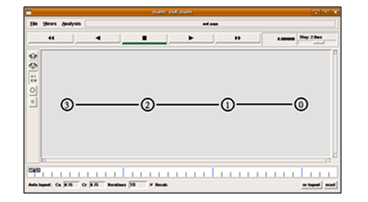
Figure 1. Illustrates the generated network topology by NS2
Normally, the mid-link can be made a duplex link like the others or maybe two simplex links. One is for sending while the other is for receiving, and this link type is more practical because in real network life, the congested link will experience weakness in one direction only. This will constitute a weak downlink from the user’s side to stream the desired video.
The mid-link was implemented as a duplex connection, and then it characterizes a fully corrupted link in both directions of downlink and uplink. This happens when the channel is subjected to any kind of noise. See Appendix A, Table 1.
1.To ensure an accurate evaluation of video streaming performance within the simulated network, the following elements must be configured appropriately
After building the network topology, the next step is the reconstruction of the transmitted video as it is seen by the receiver. For this, the video and trace files are processed by etmp4 (Evaluate Traces of MP4-file Transmission). After running the simulation, NS2 creates two files, sp and rp. The file sp is used to record the sending time of each packet, while the file rp is used to record the received time of each packet. This is for calculating some important parameters, like the average end-to-end delay. A utility is used for that called (etmp4.exe); the full command line is:
etmp4 -f -0 sp rp traceout send.mp4 final.mp4
Where -f means frame mode, -0 means it fills the lost sections with zeros, sp is an output file from NS2 simulation for recording the sending times for packets, and rp is also an output file from NS2, but this is for recording the receiving times of each of the received packets, as mentioned before. traceout is the name of the video trace file obtained from the first steps before the simulation process started, send.mp4 is the name of the main hinted video file as a reference, then final.mp4 is the output generated video file mixed up with the data to generate the possibly corrupted.
2.The final step is to convert the generated MP4 file back into a raw YUV format for the sake of watching because of the abundance of one of the tools used in Windows, which is the YUV video viewer, to watch raw YUV videos. This step is optional and depends on the desired format to watch. Maybe once the MP4 codec is installed, there will be no need to convert it to YUV format to watch; it will be watchable by the operating system media players directly if the MP4 codec libraries are properly registered and embedded into the system.
3.1.Case 1: Mid-Link Bandwidth 10Mbps
In this case, packet transfer can also be shown using a mid-link bandwidth of 10 Mbps, which is identical to the other network links. Logically, there should be no packet drop. While practically with the simulator, a package drop was experienced, but to such a small extent that nothing was felt to be lost in the output video. The other evidence can also be seen from the queue between nodes (1) and (2), which should indicate if the link cannot take the data rate transmitted from the sending side. Figure 2 shows this case, where the queue was zero all of the time. The packets are marked in red and can be seen in the nam output of Figure 2.
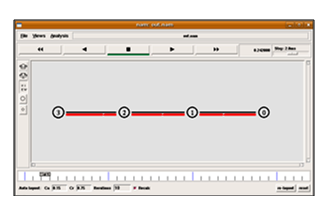
Figure 2. Illustrates the packet flow over the network links at 10 Mbps
So, in this case, the queuing is ineffective and not even needed as long as the links are able to forward the data straight forward. Figure 3 shows the number of packets dropped, end-to-end delays, and some other parameters that are calculated by Tracegraph to show the details of the case 1 packet flow.

Figure 3. The main parameters of the packet flow for the network link using the trace file
From Figure 3, the total packets sent were 3590, while the dropped ones constituted 113 packets, constituting a size of 110.214 KB of data lost from the main file as a whole. The dropped packets may be removed by increasing the link bandwidth slightly. Which is practically insignificant, as Figure 4 shows, especially when the video was made sure to be unaffected. Only one frame was enough to check, which was frame number 59.
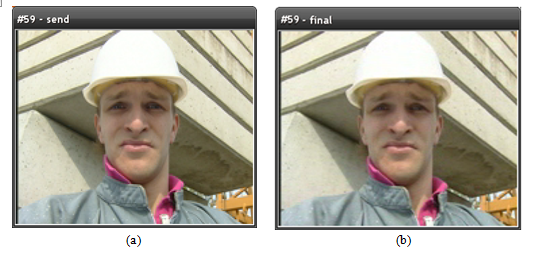
Figure 4. The video clip sent through the network link. (a) the video at node 0 (sender); (b) the received video at node 3 (receiver).
Also, Figure 5 illustrates the average end-to-end delays,where the average end-to-end delay was about 5.515 msec.

Figure 5. Measurement of the average end-to-end delay.
3.2.Case 2: Mid-Link Bandwidth 8Mbps
In this case, the mid-link speed is reduced from 10 to 8 Mbps. Packet drop can be seen from the nam graph in Figure 6, where the queue filled a moment after starting the simulation because it needs the queue to fill up for the sake of drop to start as long as the queue is a first in first out memory type.

Figure 6. Illustrate the packet drops using 8 Mbps bandwidth link connection between nodes 1 and 2
Figure 7 shows the statistics obtained from the Tracagraph file and displays the number of packets dropped. The number of dropped packets reached 600, with the same number of packets sent in case 1when the bandwidth of the link was 10 Mbps.

Figure 7. Shows the statistics from the Tracagraph file while sending packets
This led to the loss of 596.769 KB of details from the main video file, and that is considered a big amount of the lost data that affected the received video. Figure 8 represents the effect of the drooped packets in the receiver node, where the same frame in case 1 was captured and compared. Regarding the statistics of the trace graph on cases 1 and 2, decreasing the mid-link bandwidth by 20% of its capacity increases the dropped packet more than 5 times, and the lost packets increase to 505 lost packets. The effect of packet drop is obvious, as Figure 8(b) represents.
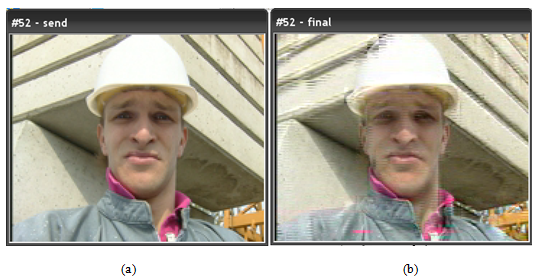
Figure 8. Displays the effect of the dropped packets on the receiver node. (a) The video at node 0 (sender); (b) the received video at node 3 (receiver).
Figure 9 shows the end-to-end delays, where the average end-to-end delay has increased from 5.515 msec in case 1 to 17.1 msec in this case, almost three times the delay in case 1.
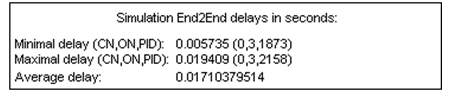
Figure 9. Illustrate the average end-to-end delay in case 2.
In this case, the queue size may make sense when changing its capacity value. When increasing it, it means increasing the buffer size, which will delay the corruption of the video for a longer time. Shortening it means decreasing the queue, which is decreasing the buffer memory, and the video will start viewing corruption earlier. The queue value has been set to a maximum of 10 packets that can fit inside, and if more than 10 packets are sent, the packets are dropped.
3.3.Case 3: Mid-Link Bandwidth 5Mbps
In this case, the mid-link speed is reduced again from 8 to 5 Mbps. Figure 10 displays the packet drop from the nam graph. The queue is full for a moment after starting to run the NS2 simulation because it needs the queue to fill up to drop the packets, as mentioned before. The drop here is much higher than in the previous cases due to degraded mid-link bandwidth to half of the needed speed to stream the video, as shown in Figure 11.

Figure 10. Illustrates the packet drops using a 5 Mbps bandwidth link connection between nodes 1 and 2.
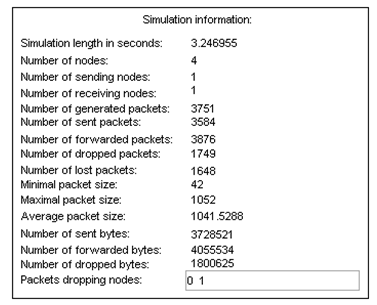
Figure 11. Illustrates the packet drops using a 5 Mbps bandwidth link connection between nodes 1 and 2.
Again, the total number of packets sent was 3590, and the number of dropped packets reached 1749, with 1648 lost packets. This led to the loss of more than 1800 KB of details from the main video file, and that is considered a very large number of losses, almost 31 times compared to case 1 and 6 times compared to case 2. The video has been affected much more than before, as many packets dropped before reaching the receiver node.
Figure 12 displays the effect of the drooped packets on the receiver node,whare the same frame was captured and compared.

Figure 12. Displays the effect of the dropped packets on the receiver node. (a) the video at node 0 (sender); (b) the received video at node 3 (receiver).
The effect of packet drop was severe on the output video, as shown in Figure 12(b).
Figure 13 shows the end-to-end delays, where the average end-to-end delay has increased from 5.515 msec in case 1 and 17.1 msec in case 2 to 26.95 msec in this case. Practically, the average delay in case 3 is more than five times that of case1, and more than 1.5 times that of case 2.
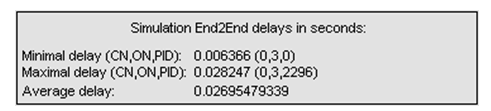
Figure 13. Illustrates the average end-to-end delay in case 3.
In this scenario, the queue size remains relevant as before. Increasing the queue size effectively increases the buffer size, which delays the onset of video corruption for a longer period of time. Conversely, reducing the queue size decreases the buffer memory, causing video corruption to appear sooner. Essentially, adjusting the queue size simply alters the time frame before corruption occurs.
4.Conclusion
Conclusion By addressing these aspects, the simulation using NS2 can provide valuable insights into how different network conditions affect video streaming performance and how compression and protocol strategies can mitigate some of these challenges.
The performance of video streaming is critically dependent on the available bandwidth between network nodes. Packets can be dropped and lost due to bandwidth limitations, leading to per-frame packet corruption during transmission. Packet loss directly affects video quality, especially in cases with lower bandwidth. When packets are dropped, the integrity of the video frames is compromised, which can result in noticeable artifacts and a degraded playback experience.
Despite the occurrence of packet drops, the video quality in the case of mid-link capacity, which was maintained at 10 Mbps, was not significantly affected. The UDP protocol, used for transmitting video data, has some fault tolerance that helps in maintaining video quality even when a small number of packets are dropped. This resilience is crucial for streaming applications where minor losses do not severely impact overall performance.
Compressing video to the MP4 format significantly reduces its size, reducing it to 25% of its size in the used video, making it more suitable for streaming over networks with limited bandwidth. This method of compression helps reduce the amount of data that needs to be transmitted, thereby conserving bandwidth and enabling more efficient streaming.
End-to-end delay is significantly affected by the bandwidth of the mid-link in the network. In scenarios where the mid-link bandwidth decreases from the standard 10 Mbps (which matches the side-links), the delay increases substantially. Specifically, the average end-to-end delay rose from 5.515 milliseconds in the first case to 17.1 milliseconds in the case of 8 Mbps, and further to 26.95 milliseconds in the case of 5 Mbps. This indicates that the average delay in the case of a bandwidth 5 Mbps is more than five times that of case 1 and over 1.5 times that of case 2. This increase in delay is detrimental to real-time video streaming, where timely delivery is crucial.
Conflicts of Interest
The author declare no conflict of interest.
Acknowledgements
I would like to express my deepest gratitude and appreciation to my supervisor, professors, and colleagues at University of Valladolid (UVa) for their invaluable contributions and encouragement towards completing my research work during my master’s degree.
Reference
[1] S. Duraimurugan and P. J. Jayarin, “Analysis and Study of Multimedia Streaming and Congestion Evading Algorithms in Heterogeneous Network Environment,” Proc. 2nd Int. Conf. Intell. Comput. Control Syst. ICICCS 2018, no. Iciccs, pp. 1248–1252, 2018, doi: 10.1109/ICCONS.2018.8663163.
[2] Y. A. Al-Sbou, “Wireless Networks Performance Monitoring Based On Passive-Active Quality Of Service Measurements,” Int. J. Comput. Networks Commun., vol. 12, no. 6, pp. 14–32, 2020, doi: 10.5121/ijcnc.2020.12602.
[3] D. M. Integration, “Streamingmultimedia over the Internet,” pp. 34–37, 2004.
[4] H.264 and MPEG-4 Video Compression: Video Coding for Nextgeneration Multimedia, vol. 6, no. 1. John Wiley & Sons., 2003.
[5] T. Phan-Xuan and E. Kamioka, “Accurate available bandwidth allocation in http adaptive streaming,” Int. J. Comput. Networks Commun., vol. 9, no. 5, pp. 83–94, 2017, doi: 10.5121/ijcnc.2017.9507.
[6] D. Wu, Y. T. Hou, W. Zhu, Y. Q. Zhang, and J. M. Peha, “Streaming video over the internet: Approaches and directions,” IEEE Trans. Circuits Syst. Video Technol., vol. 11, no. 3, pp. 282–300, 2001, doi: 10.1109/76.911156.
[7] Z. A. Kakarash, A. A. Shaltooki, D. F. Abd, Z. A. Hamid, and O. H. Ahmed, “Study of Challenges and Possibilities of Building and Efficient Infrastructure for Kurdistan Region of Iraq,” UHD J. Sci. Technol., vol. 2, no. 2, pp. 15–23, 2018, doi: 10.21928/uhdjst.v2n2y2018.pp15-23.
[8] “MPEG4 vs HEVC for video encoding | Flare Compare.” https://flarecompare.com/Video Technology/MPEG4 vs HEVC for video encoding/ (accessed Jun. 02, 2024).
[9] K. Fall and K. Varadhan, “The ns Manual (formerly ns Notes and Documentation),” VINT Proj., no. 3, p. 434, 2011, [Online]. Available: http://discovery.bits-pilani.ac.in/discipline/csis/virendra/bitsc481/ns_doc.pdf.
[10] T. Wiegand, G. J. Sullivan, G. Bjøntegaard, and A. Luthra, “Overview of the H.264/AVC video coding standard,” IEEE Trans. Circuits Syst. Video Technol., vol. 13, no. 7, pp. 560–576, 2003, doi: 10.1109/TCSVT.2003.815165.
[11] S. Nefti and M. Sedrati, “PSNR and Jitter Analysis of Routing Protocols for Video Streaming in Sparse MANET Networks, using NS2 and the Evalvid Framework,” vol. 14, no. 3, pp. 1–9, 2016, [Online]. Available: http://arxiv.org/abs/1604.03217.
[12] H. Zheng and J. Boyce, “An improved UDP protocol for video transmission over Internet-to-wireless networks,” IEEE Trans. Multimed., vol. 3, no. 3, pp. 356–365, 2001, doi: 10.1109/6046.944478.
Appendix A
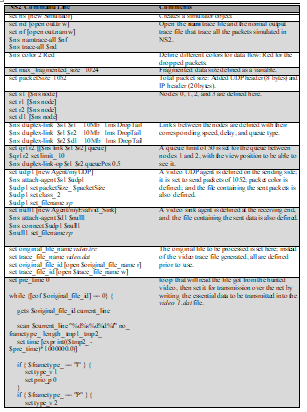
Table 1. shows the NS2 tool command language (TCL) full script code.


 International Journal of Computer Networks & Communications (IJCNC)